The CoreDash bots: what they request and how to recognise them
CoreDash/1.0 in your logs is one of two CoreDash bots, and both only open pages a CoreDash customer asked for.
Who runs the CoreDash bots, and why they visit
In short
- CoreDash has two bots: the uptime check asks for a page every 30 minutes, and the cRUM audit, a speed test of a single page, loads it once in Chrome when a customer opens that page's report.
- Both send a user agent that starts with
CoreDash/. Their addresses are in ips.json, and CoreDash customers also get a secret token in a header. - To let them in, allow the user agent. If you'd rather not have them, contact CoreDash and the visits stop.
CoreDash is a real user monitoring tool for Core Web Vitals. Website owners use it to see how fast their pages load for real visitors, on mobile and on desktop. CoreDash is based in Bergen op Zoom, in the Netherlands, and runs both bots itself.
A CoreDash bot visits a page only when a CoreDash customer asks for it: by adding the page to an uptime monitor, or by opening that page's audit. The bots follow no links and never go looking for pages on their own. Nothing they fetch ends up in a search index or trains an AI model. The results go to the customer who asked, and to nobody else.
CoreDash user agents
CoreDash/1.0 (uptime; +https://www.coredash.app/bot)
CoreDash/1.0 (audit; +https://www.coredash.app/bot)
The word in brackets says which bot sent the request, and the link brings you to this page. Every CoreDash tool sends a user agent that starts with CoreDash/, tools added later included. A log search or a firewall rule on CoreDash/ finds them all. Anyone can send that name, though, so check the address a request came from against ips.json too.
The uptime check and the cRUM audit
In a server's access log, the two bots look like this: the uptime check on the hour and on the half hour, and one audit that loads a page together with its CSS and an image.
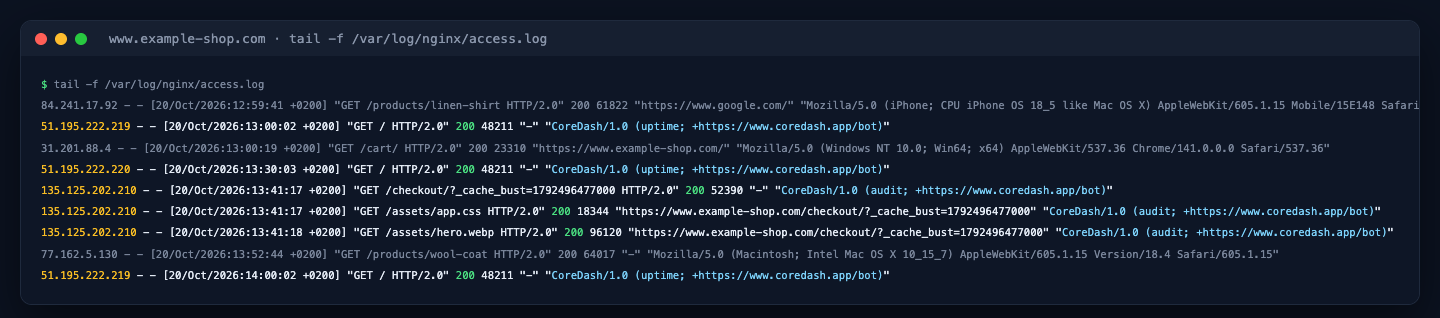
The access log of www.example-shop.com.
The uptime check
A customer adds a URL to an uptime monitor in CoreDash. From then on, the uptime check asks for that URL every 30 minutes: one CoreDash server on the hour, the other on the half hour. That makes 48 checks a day for each monitor.
Each check is one GET request for the HTML, plus one more for every redirect, up to five in a row. It reads at most the first 256 KB of the answer and loads no images, scripts or CSS. If the customer entered the IP address of the site's server, each check also sends a request straight to that server, around the CDN, to see whether the server itself answers. CoreDash keeps the status code and the timings, and nothing of the page itself.
The cRUM audit
The cRUM audit is CoreDash's speed test of a single page. It runs when a customer opens that page's report in CoreDash, and again when they start it over or switch between phone and desktop. There is no schedule: a page whose report nobody opens never gets an audit.
The audit loads the page once in Chrome, with the cache off, as a first-time visitor on a phone or a desktop. Chrome then fetches everything the page asks for, the CSS, scripts and images, the same as for any visitor. In your log you see the request for the page with _cache_bust= and a timestamp added to its URL, followed by the requests for its files, all with the audit user agent.
Files the page loads from another site, such as a web font or an analytics script, go out with the audit user agent as well. If you host such a file, CoreDash can show up in your log for a page that isn't yours. Each of those requests is part of loading the page a customer chose.
How to check that a request came from CoreDash
CoreDash publishes the addresses its bots send from at app.coredash.app/bot/ips.json. It's a JSON file in the format Google uses for the addresses of its crawlers, with a service field that says "uptime" or "audit" for each address. A request with a CoreDash user agent from an address that isn't in that file didn't come from CoreDash.
These addresses can change: CoreDash adds or moves servers from time to time. Always check against the file as it is now. Its creationTime changes with every change to the list.
CoreDash customers have a second check. Every project has its own secret bot token, and both bots send it in the X-CoreDash-Bot header when they visit the project's own site or one of its subdomains. A visit to any other site carries no token. The token is in CoreDash under Project settings, tab "CoreDash bot token".
Letting the CoreDash bots through your firewall
A firewall or CDN sometimes takes the CoreDash bots for bots it doesn't trust and blocks them. To let them in, allow requests whose user agent starts with CoreDash/. If the site is in your own CoreDash project, a rule on your bot token is safer, because only your project's requests carry it. Allow the IP addresses only when nothing else works, and keep in mind that they can change. Let the CoreDash bots through your CDN or firewall has the steps for Cloudflare and AWS WAF.
Why the CoreDash bots don't read robots.txt
A robots.txt file tells crawlers which pages they may visit when they go through a site by themselves. The CoreDash bots never do that. Every visit is one a customer started, the same way Lighthouse loads a page when someone runs a test on it. That's why neither bot reads robots.txt, and a Disallow line won't stop them.
Stopping the CoreDash bots on your site
If you have a question about the bots, or you'd rather not have them on your site, contact CoreDash through the contact page. Send the URL and a CoreDash line from your log. CoreDash then stops the visits to your site.

