Uptime monitoring, included with your Core Web Vitals
Know when your site or your checkout stops working, and how fast your server answers the rest of the time.
Add a monitorIncluded in every plan and in the free trial.
Trusted by market leaders · Client results




















Your site looks fine and the orders have stopped
Your server stops answering and the CDN keeps handing out the cached homepage. Or a release breaks the checkout and leaves every other page alone. Nobody notices until a customer emails to ask why they can't pay.
CoreDash watches both for you, in the same project as your Core Web Vitals.
An email and a Slack message when your site goes down
When your site goes down or a page answers with the wrong status, you get an email and a Slack message, and another one when it's back. Add the pages that matter, starting with your homepage and your checkout, and CoreDash checks each one every 30 minutes.
A monitor only turns Down after two failed checks in a row from two different servers, so one network hiccup won't wake you up.
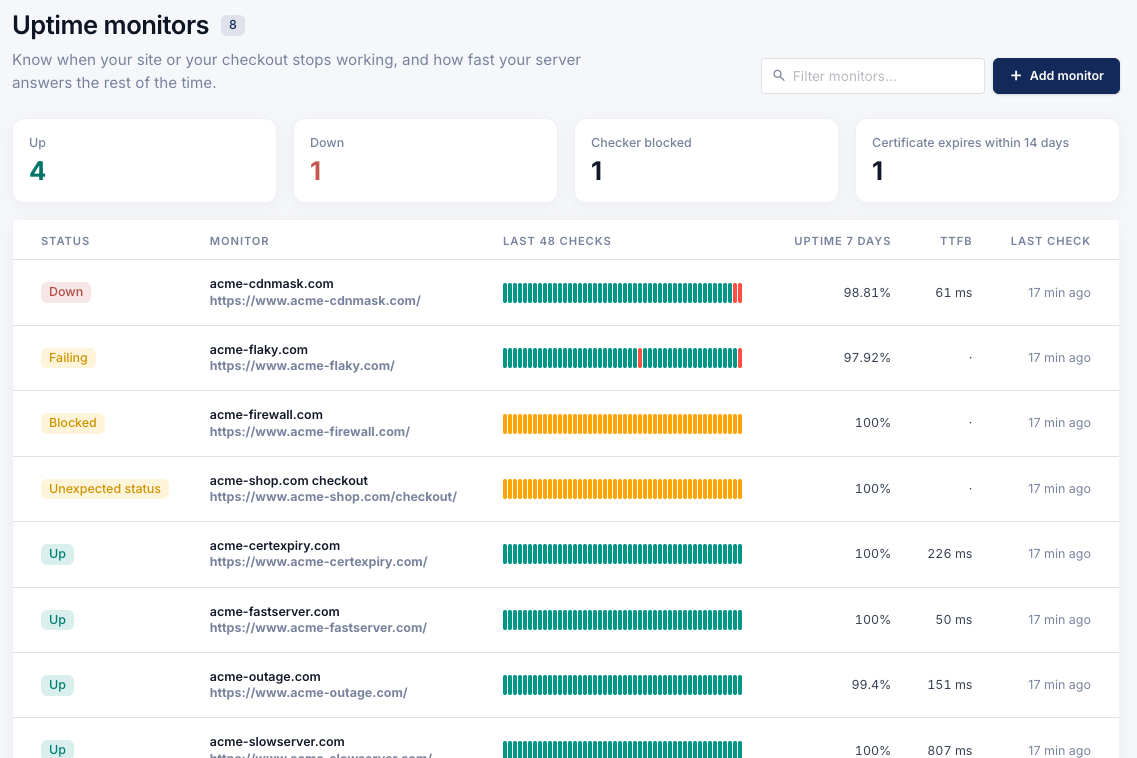
Every site and page you watch in one list, with the uptime of the last 7 days and any certificate that runs out within two weeks.
See the outage your CDN hides
Your CDN can keep serving cached pages while your server is down. The homepage still loads, but logged-in customers, carts and every page that isn't cached get an error. CoreDash marks the site Down anyway: enter your server's IP address under Advanced when you add or edit a monitor, and every check also asks the server itself, around the CDN.
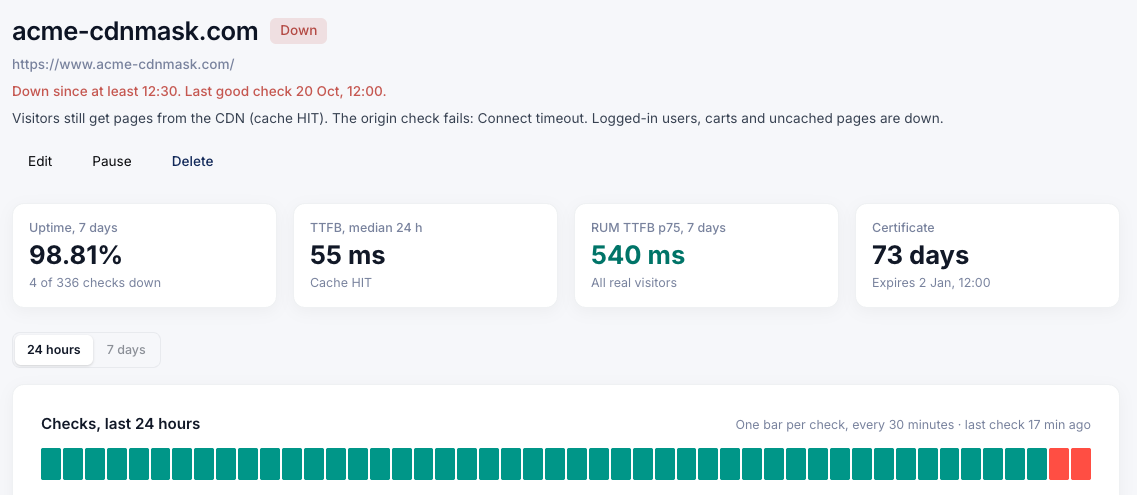
How much of your visitors' wait is your server
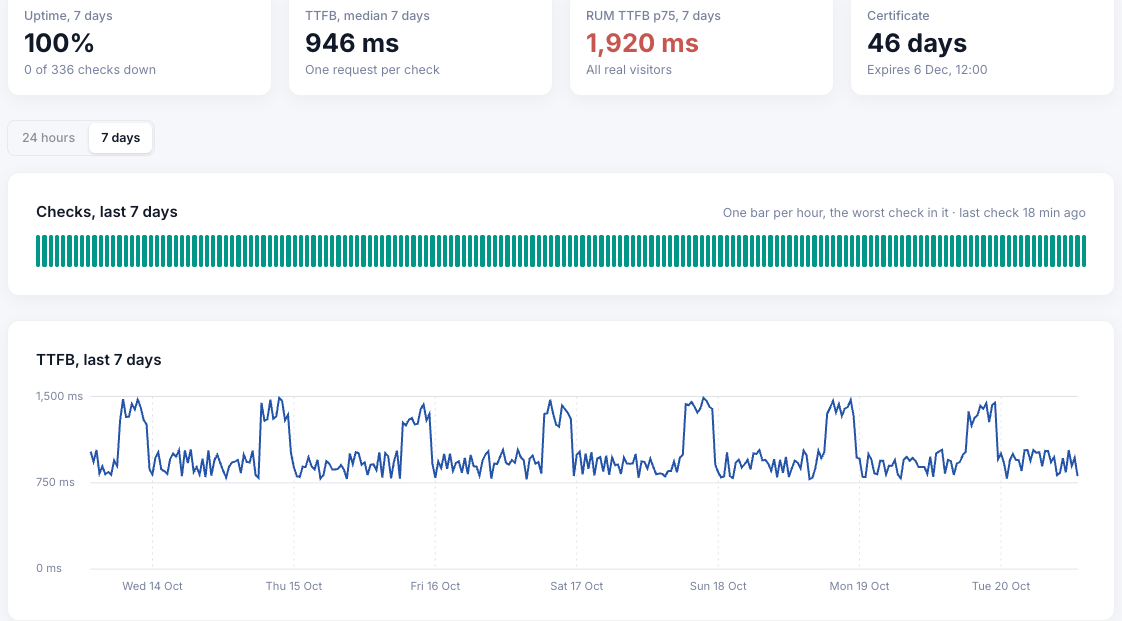
In this example, about half of what visitors wait for is the server. CoreDash puts the response time of every check next to the TTFB your real visitors get at p75: around 950 ms from the checker, with a peak every evening, against 1.92 s for visitors.
The largest image or heading can't appear before the server answers, so a faster LCP here starts with the server.
Catch the checkout that broke in the last release
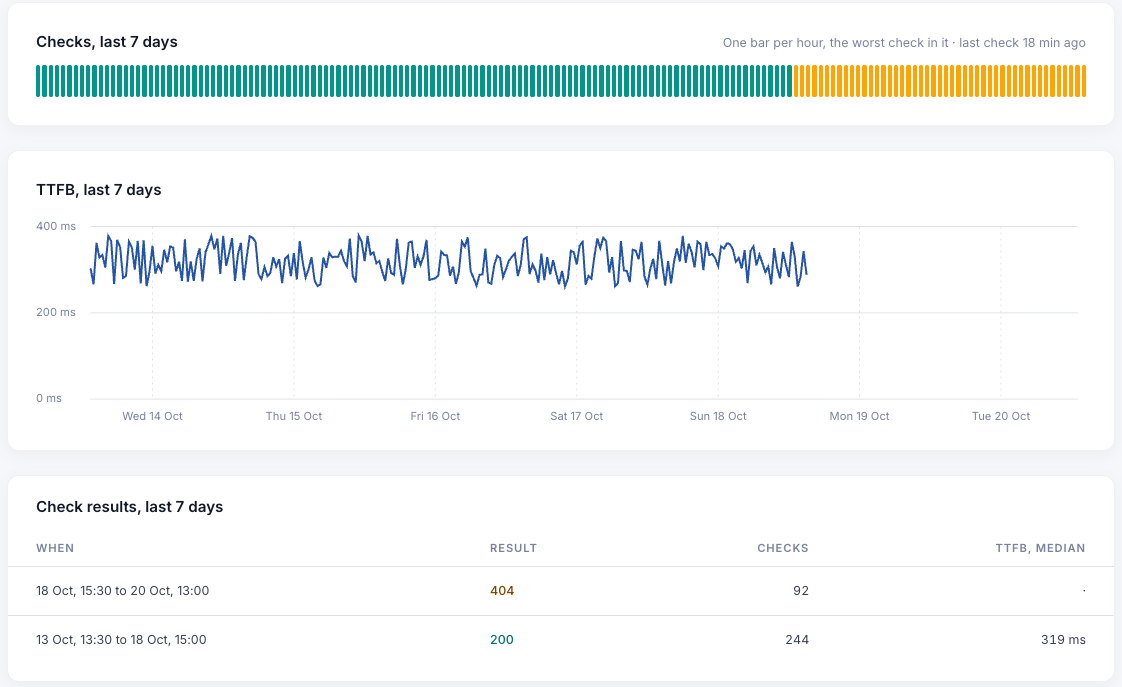
After a release the homepage can still answer while the checkout says "page not found", and a monitor on the homepage sees nothing wrong.
Here the checkout has its own monitor. It worked for five days, and since a release two days ago it answers 404, which CoreDash marks as Unexpected status. That sends you an email and a Slack message too, and another one once the checkout works again.
No false alarms from your firewall, and certificates spotted two weeks before they expire
A firewall that blocks the checker never sets off an outage alert. The monitor says Blocked, links to the fix and doesn't count it as downtime.
Your monitor list also counts every certificate that expires within 14 days. A forgotten renewal shows up there two weeks before browsers start warning your visitors.

What happens after a crash at 19:50
Your server stops answering at 19:50. At 20:00 the first server gets no answer and the monitor turns Failing; nothing is sent yet. Half an hour later the second server gets no answer either. The monitor goes Down, and the email and the Slack message go out.
At the first check that gets an answer again, the monitor turns Up and the all-clear goes out the same way. Depending on when your server stops, you hear about it 30 to 60 minutes later.
Uptime in the project your team already opens
Every monitor belongs to a CoreDash project, and everyone on that project sees it next to the LCP, INP and CLS of the same site. It comes with the subscription you already have, and with the trial. Ask Claude "was my site down this week?" in the same chat where you ask why the LCP on mobile went up. Connect Claude to CoreDash.
When you need a dedicated uptime tool
CoreDash checks every 30 minutes from two servers in one region and alerts by email and Slack. A short outage between two checks can slip through, and there's no public status page and no SMS. For checks every minute from many countries, a dedicated uptime tool is worth paying for.
To know that your site and your checkout work, and how fast your server answers, you don't need one. It's already in your CoreDash project, at no extra cost.
Frequently Asked Questions
Does uptime monitoring cost extra?
No. Every subscription and the free trial include it, and your monitors keep running as long as your project does. See pricing.
How often is my site checked?
Twice an hour. One server checks on the hour, the other on the half hour.
Where are the alerts sent?
To the email addresses of the people on the project, and to Slack once Slack is connected to the project.
Do I need to change my firewall?
Only if it blocks the checker. Every check sends the CoreDash user agent and your project's bot token, and a firewall rule can let it through on either. How to let CoreDash through.
How many monitors can I add?
Up to 25 per project. One monitor checks one URL: the homepage, the checkout and the login are three monitors.
Do I need the CoreDash script on my site for uptime?
No. A monitor only needs a CoreDash project, and the checks run either way. The card with your visitors' TTFB stays empty until real-user data from the script comes in.
Start with the page that makes money
Open Uptime in your CoreDash project and add your checkout. The first check runs on the next hour or half hour.
Add a monitorNo CoreDash account yet? Start a free trial; uptime monitoring is included.